Vinyl Flooring
LVT Grout Effects: Printed Lines, Bevels or Separate Strips?
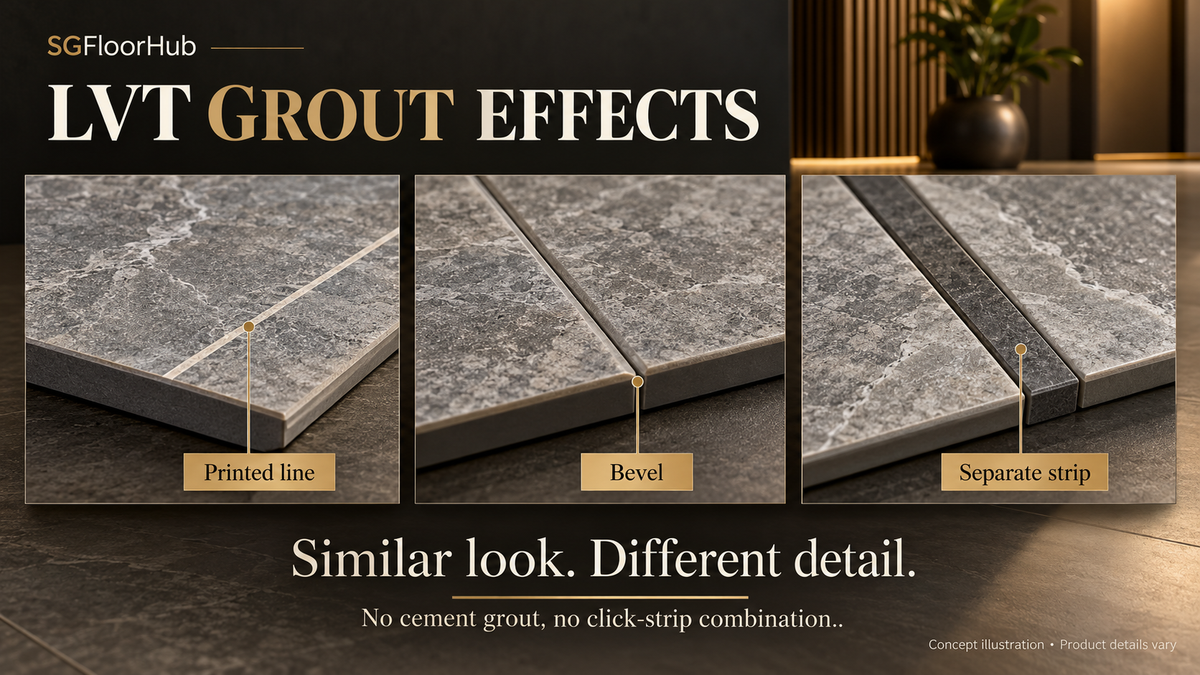
A grout effect may be printed, formed at the edge or made with a separate strip. Identify the detail before choosing the tile and layout.
Quick answer
A grout-looking line in LVT is not necessarily cement grout or an open joint. It may be part of the print, a bevel or a separate compatible vinyl strip. Specify which detail creates the line, its colour and width, and whether the exact flooring format allows it.

Identify the line you are actually seeing
Room photographs often make several different joint treatments look similar. A tile can contain a printed grid inside its own face. A bevel can create a shadow at an edge. A separate design strip can form a contrasting line between gluedown units. These details are not interchangeable simply because the finished image suggests grout.
Karndean's US design-elements page gives a specific example of narrow LVT strips for gluedown flooring. It identifies 3 mm and 10 mm strip widths. Those are that manufacturer's published options, not default joint dimensions for every LVT system.
Turn a visual preference into a joint schedule
| Joint effect | What to identify | What the sample must show |
|---|---|---|
| Printed line | Its position within the tile artwork | Full tile face and adjacent tiles |
| Bevel or groove | Edge shape, colour and sides treated | Two or more pieces meeting |
| Separate strip | Strip reference, width and compatibility | Actual tile–strip–tile assembly |
| Approved grout system | Exact product and manufacturer method | Documented detail, not an assumed ceramic method |
Do not instruct an installer to leave a gap and fill it with ordinary grout unless the product's own system expressly permits that method. Likewise, a compatible strip for a gluedown collection should not be inserted into an unrelated click joint.
Read tile spacing at room scale
A contrasting line changes the apparent module. In a fictional design study, a 500 mm square face combined with a 5 mm strip would create a nominal 505 mm repeating pitch in a simple grid. This is an arithmetic illustration, not a real product specification or a cutting allowance. Manufacturer dimensions and the actual junction detail take precedence.
The line's contrast matters as much as its width. A pale strip against a dark tile may dominate a small sample arrangement, while a similar-tone strip may largely disappear from a doorway view. Approve both a close view of the junction and a wider view showing several modules.
Approve the joint as part of the product selection
Record tile code, flooring format, strip or edge reference, orientation and the approved drawing. State explicitly if the photographed floor uses an optional accessory. Otherwise the supplied product can be correct while the expected appearance is not reproduced.
For a Singapore quotation, ask whether the pictured strip is included and locally supplied with the selected range. Keep the answer in the material schedule. The purpose is to define the visible design detail; installation tolerances, preparation and movement requirements remain governed by the flooring manufacturer's instructions.
Frequently asked questions
Can I add design strips to any click LVT?
No. Confirm an approved detail for the exact format; strips offered for gluedown flooring do not establish compatibility with a click joint.
Does a dark line mean the tiles are separated by an open gap?
Not necessarily. It may be printed artwork, a coloured bevel or a separate strip. Inspect the product detail.
Sources and scope
Sources checked 15 October 2026. Manufacturer examples describe the named range and market; they do not confirm Singapore stock, local certification or approval for a particular project. Selection exercises and diagrams are original SGFloorHub editorial illustrations, not product tests or completed installations.
Continue reading
Written by SGFloorHub Editorial. Reviewed for scope, source attribution and product identification on 15 October 2026.
Independent editorial guidance. Check the current documents for the exact product and project.
Editorial standardsSuggest a correctionCONTINUE READING
More from this subject.

Vinyl Flooring
Large-Format LVT: Specify the Module Before the Look
Large-format describes proportion, not a performance grade. Define the actual module and review how it meets the room edges and fixed features.
Read article Large-Format LVT: Specify the Module Before the Look
Vinyl Flooring
Vinyl Sheet Roll Widths: Understanding Product Options
Roll width is a supplied-product dimension that needs a matching design and construction reference. Learn how to read a real width example, distinguish nominal format from a lay...
Read article Vinyl Sheet Roll Widths: Understanding Product Options
Vinyl Flooring
Woven Vinyl Flooring: Reading the Weave and Backing
A textile-like appearance does not identify a woven floor. Examine the actual weave, backing, format and viewing direction as one product.
Read article Woven Vinyl Flooring: Reading the Weave and Backing